
XenoVox® – REAPER EXPORT FEATURE
Outspoken Audio announce the v1.6.7 update to their standalone dialogue production tool including Reaper project export.

OVERVIEW
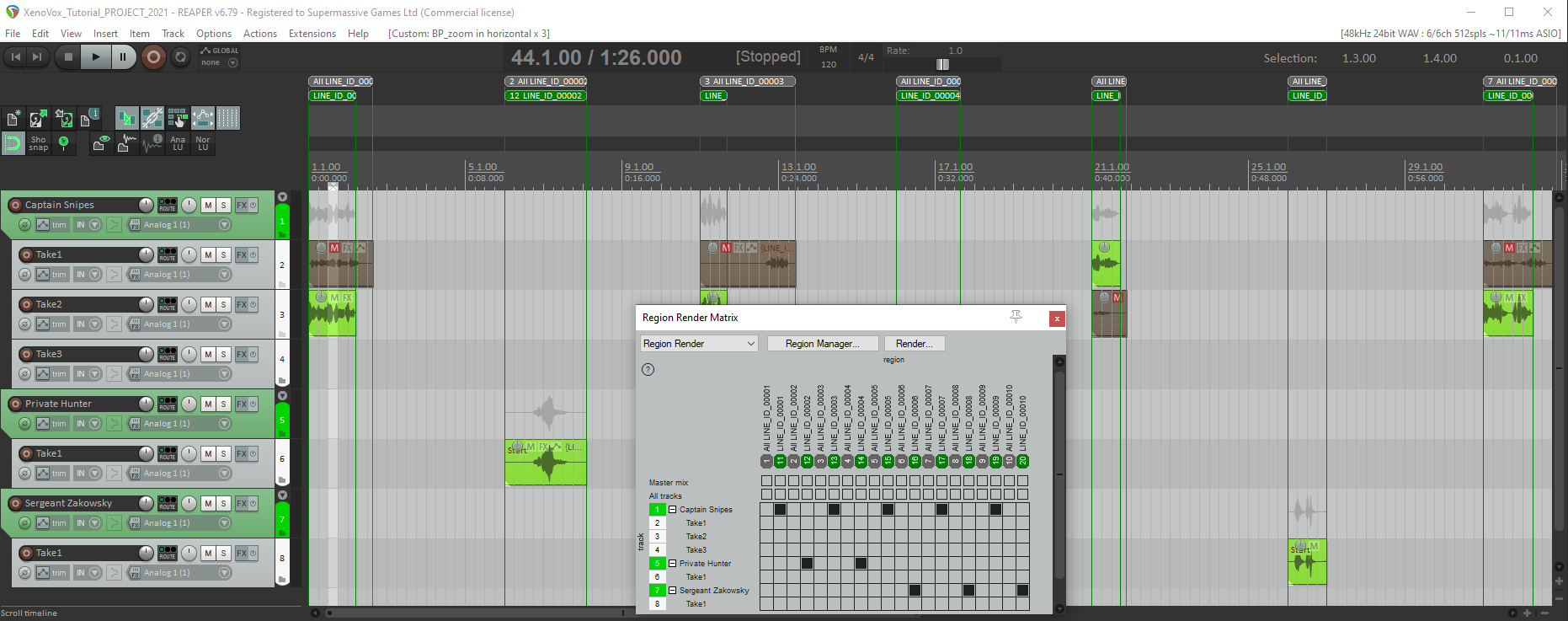
Reaper Project Layout:
- Folder tracks by character name
- Sub tracks by take number
- Item colour matches XenoVox status hierarchy colour
- Regions matching item length for ‘All takes within an ID’ and ‘Choice’
- Prepopulated Render Region Matrix for instant rendering.
HOW DO I ACCESS THE FEATURE?
This feature is included in the main app as standard.
XenoVox app and tutorial project (inc script and recordings) are available here including a 30 day trial* to get you up and running.
HOW DO I PROVIDE FEEDBACK?
Directly from the app via Help menu > Feedback…
Our Contact form here
Email support@outspokenaudio.com
TUTORIAL – XENOVOX REAPER EXPORT
- select the lines in XenoVox you wish to export
- open the export dialogue (ctrl+E)
- select destination, options and status inclusion (noting Reaper export supports only ‘Latest Versions’)
- make sure to include the option of ‘Generate Reaper project’
- hit ‘Go’
- navigate to the export folder and double click on the .proj Reaper file.
- NOTE – timecode critical projects should use ‘Item: Move to media source preferred position (BWF start offset)’ to sync recordings to source timecode.
TUTORIAL – RE-IMPORT TO XENOVOX
- render all files to a chosen directory
- open the XenoVox import dialogue
- import files using the standard options
- now you have all mastered files available for prompting new voice recordings as virtual ensemble sessions
Please go to www.outspokenaudio.com for more on XenoVox including Free 30-day trial*, demo project, FAQs and the ‘XenoVox explained’ series of tutorials.
XenoVox – the most immersive performance yet.
“XenoVox is really easy to understand and to learn. The recording shortcuts and take selection are easy to use.” – AAA Audio Director, Canada
“For checking filenames against the script IDs alone, XenoVox saved us days.” – Freelance Audio Director, UK
*Limited to 50 script lines
 128 City Road, London, EC1V 2NX